WP Rocket Review: Is It Worth It for Speed & SEO?

This post contains affiliate links, which means we may receive a commission if you purchase through our links, at no extra cost to you. We only recommend blogging tools we use ourselves. Please read full disclosure for more information.
I’ve spent more hours than I care to admit staring at GTmetrix, PageSpeed Insights, and Lighthouse reports.
I’d run a test, see a list of warnings, and then spend the next few hours trying to figure out what they actually meant.
Sometimes ChatGPT helped.
Sometimes things made sense.
Most of the time, I was just frustrated.
I wanted a faster website—not a crash course in website performance.
That’s what eventually led me to WP Rocket.
In this review, I’ll share my experience using the plugin, my favorite features, and why I think it’s worth it for bloggers who’d rather create than troubleshoot.
The Real Problem With Website Speed
Most bloggers don’t wake up one morning and decide they want to learn about Core Web Vitals.
I certainly didn’t.

I thought I wanted a faster website.
What I actually got was a rabbit hole of performance reports, technical recommendations, and terminology I barely understood.
I’d run a speed test, see a long list of warnings, and spend the next few hours trying to figure out what was worth fixing and what I could safely ignore.
The result?
I spent more time worrying about website speed than creating content.
And that’s the real problem.
Most bloggers don’t want faster websites because they’re obsessed with performance scores.
They want:
- A better experience for readers
- Stronger SEO performance
- Confidence that their site is running well
- Less time troubleshooting technical issues
Why Speed Matters
- Visitors don’t like waiting. A slow site means more people leave before reading your content.
- Google cares about user experience. Website performance is one of many factors that can affect rankings.
- Small delays add up. The longer a page takes to load, the more opportunities you have to lose readers, subscribers, and customers.
What Happened When I Installed WP Rocket
By the time I found WP Rocket, I was spending far too much time thinking about website speed.
I didn’t want to become a performance optimization expert.
I just wanted a faster website.
That’s what I appreciated about WP Rocket right away. It was incredibly easy to set up.
I installed the plugin, activated it, and many of the performance improvements were applied automatically.
- No coding
- No complicated configuration
- No spending an entire weekend watching YouTube tutorials
That doesn’t mean every speed issue magically disappeared overnight. But it did give me a solid foundation to build on.
Over time, my site felt faster, performance scores improved, and I spent less time obsessing over speed tests.
And honestly, that was exactly what I was looking for.
What WP Rocket Actually Handles
WP Rocket takes care of many of the speed optimizations that would otherwise require multiple plugins or a lot more technical knowledge.
This includes:
- Page caching
- File optimization
- Lazy loading
- Database cleanup
- Core Web Vitals improvements
The reason I like WP Rocket isn’t because it offers the most settings.
It’s because it handles many of the essentials without requiring much effort on my part.
Create More, Fix Less
Want a Faster Website Without the Headache?
If you’re tired of spending hours tweaking Canva templates, Haute Stock makes it easier to create cohesive, professional-looking content in less time.
What Makes WP Rocket So Effective?
One of the things I like most about WP Rocket is that it takes care of much of the heavy lifting behind the scenes, making website performance much easier to manage.
Here are some of the features that make the biggest difference.
Page Caching (The Biggest Speed Boost)
Page caching is one of the main reasons WP Rocket can improve website speed so quickly.
It creates static versions of your pages, which means visitors don’t have to wait for WordPress to build everything from scratch every time they visit.
The best part?
It works automatically, making it one of the easiest ways to improve performance.

File Optimization (Less Technical Headache)
WP Rocket can also optimize CSS and JavaScript files to help your website load more efficiently.
I’ll be honest: I don’t fully understand every technical detail behind file optimization, minification, and JavaScript delays.
What I do appreciate is that WP Rocket makes many of these improvements accessible without requiring me to become a developer first.
Lazy Loading (Great for Image-Heavy Blogs)
If your blog posts contain lots of images, lazy loading can make a noticeable difference.
Instead of loading every image immediately, WP Rocket loads images as visitors scroll down the page.
This helps pages feel faster and improves the experience for readers—especially on longer posts.
Database Cleanup (Because WordPress Collects Clutter)
Over time, WordPress accumulates things you no longer need, such as post revisions, old drafts, spam comments, and temporary data.
WP Rocket makes it easy to clean up that clutter and keep your site running efficiently.
CDN Integration (Helpful for International Audiences)
If you have readers from different countries, a CDN can help your content load faster by serving it from locations closer to your visitors.
WP Rocket has always supported popular CDN services, making setup much easier.
One of the latest updates introduces a redesigned Content Delivery section.
If you don’t already use a CDN, you can enable RocketCDN directly from inside WP Rocket. If you already use your own CDN, you can also manage those settings from the same place.
My websites already use Cloudflare through BigScoots, so I haven’t switched to RocketCDN myself. But I like that WP Rocket continues adding features that make website optimization easier, especially for beginners.
Mobile Optimization (Where Most Visitors Are)
For many bloggers, most traffic comes from mobile devices.
WP Rocket includes several optimizations that help improve performance on phones and tablets, which is important because mobile visitors are often the least patient when it comes to slow-loading websites.
Create More, Fix Less
Want a Faster Website Without the Headache?
If you’d rather spend your time creating content than deciphering speed reports, WP Rocket is one of the easiest performance plugins I’ve used.
Rocket Insights: My Favorite WP Rocket Feature
I should probably start with a confession.
Rocket Insights launched in 2025, but I only started using it recently.
Not because I was waiting to see if it was any good.
I actually tried it when it first launched, ran into an issue, looked up how to fix it, and immediately decided that sounded like a problem for Future Me.
Fortunately, Future Me eventually got around to it. And now I completely understand the appeal.
Rocket Insights was developed in collaboration with GTmetrix and brings website performance monitoring directly into WordPress.
What This Actually Means for You
With Rocket Insights, you can:
- Track important pages on your website
- Monitor metrics like LCP, CLS, TBT, and TTFB
- View recommendations directly inside WordPress
- Re-test pages and track improvements over time
One thing I really like is that recommendations aren’t just presented as technical issues.
If a recommendation relates to a WP Rocket setting, you can click Activate and jump directly to the relevant setting inside the plugin.
That might sound like a small thing, but it removes a lot of the guesswork.
Instead of wondering where a setting is located—or whether it even exists—you can go straight to the area that needs attention.

Why I Like It
For me, Rocket Insights helps bridge the gap between performance testing and actually taking action.
I don’t need another tool telling me my site has issues.
I need help understanding what those issues are and where to start. And Rocket Insights makes that process much simpler.
Less Guesswork
Understand What Your Speed Reports Are Actually Telling You
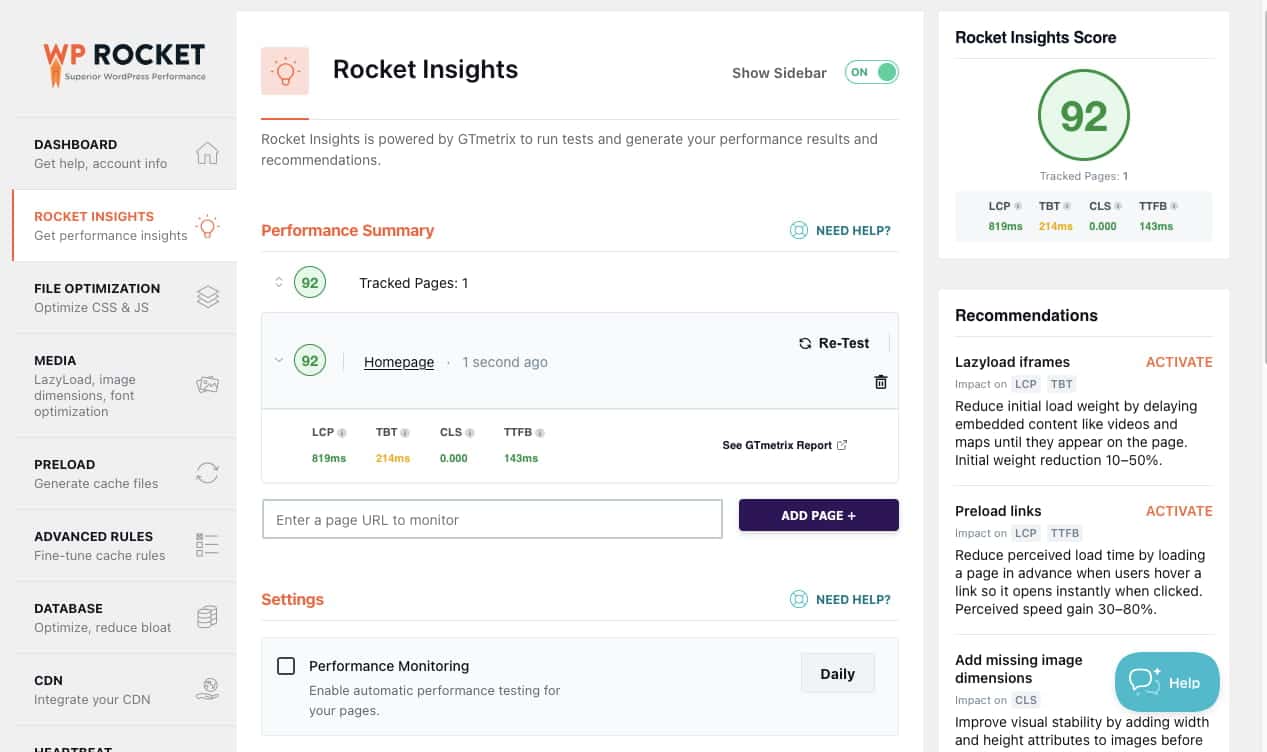
Rocket Insights brings performance monitoring directly into WordPress and helps you identify what to fix next.
How My Site Performs Today
One thing I want to be transparent about is that I don’t have performance reports from before I started using WP Rocket.
I never saved any reports back then. My focus was simply on improving my website.
What I can share is how my site performs today and the tools that are part of my current setup.
Using Rocket Insights, my homepage currently has a performance score of 92.
If those metrics look a little intimidating, here’s the simple version:
LCP (Largest Contentful Paint): 819ms
This measures how quickly visitors can see the main content on the page.
Think of it as your website’s first impression.
At 819ms, this is an excellent result.
TBT (Total Blocking Time): 214ms
This measures how quickly visitors can interact with your site while it’s loading.
Lower is better.
At 214ms, there’s still some room for improvement, but considering the site runs Journey ads, I’m pretty happy with that result.
CLS (Cumulative Layout Shift): 0.000
This measures visual stability.
In other words, things stay where they’re supposed to stay instead of jumping around while the page loads.
A score of 0.000 is perfect.
TTFB (Time to First Byte): 143ms
This measures how quickly the server responds when someone visits your website.
At 143ms, this is an excellent result and a good sign that my hosting is performing well. (I use BigScoots).
What I Find Most Useful
Rocket Insights doesn’t just show performance data. It highlights opportunities for improvement and lets you jump directly to the relevant WP Rocket settings.
For someone who has spent far too much time trying to figure out what speed reports actually wanted me to do, that’s incredibly helpful.
It’s also worth mentioning that WP Rocket isn’t the only performance tool I use.
My current setup includes:
- WP Rocket
- Perfmatters
- ShortPixel
- BigScoots hosting
- A lightweight 17th Avenue theme
- Journey by Mediavine ads
In my experience, website speed is rarely about a single plugin. It’s usually the result of multiple tools working together.
That said, WP Rocket remains one of the core pieces of my setup and one of the few plugins I’ve continued using for years.
Who I Think WP Rocket Is For
WP Rocket is a great fit if:
- You want a faster website without spending hours troubleshooting
- You run an established blog with a growing amount of content
- You prefer simple tools that work right out of the box
- You want clearer performance insights without juggling multiple tools
Who WP Rocket Might Not Be For
WP Rocket may not be the best fit if:
- You’re comfortable managing multiple free optimization plugins
- You enjoy fine-tuning every performance setting yourself
- Your site is very small and speed isn’t currently a concern
It’s also worth remembering that WP Rocket isn’t a substitute for quality hosting, optimized images, or a lightweight theme.
It’s one piece of a larger performance strategy.
WP Rocket Pros and Cons
Pros
Cons
Final Verdict: Is WP Rocket Worth It?
If you’re a developer who enjoys tweaking every performance setting manually, there may be more customizable solutions available.
But if you’re a blogger who wants a faster website without spending hours troubleshooting performance issues, WP Rocket is one of the easiest solutions I’ve used.
It won’t solve every speed issue overnight, and it’s certainly not a replacement for quality hosting, optimized images, or a lightweight theme.
What it does do is simplify website performance.
And for me, that’s been the biggest benefit.
I wanted a faster website—not a crash course in website optimization.
WP Rocket helped me get much closer to that goal.
WP Rocket Q&A
*We only recommend tools and resources we personally use and love. These are essentials we genuinely believe can support you, just as they’ve supported us.
"Page Experience in Search." Google Developers Blog, 27 Apr. 2023, https://developers.google.com/search/blog/2023/04/page-experience-in-search?hl=en. Accessed 13 December 2024.
Petrosyan, Ani. Global Internet Access Q2 2024, by Device. Published by Statista, 5 Nov. 2024, https://www.statista.com/statistics/1289755/internet-access-by-device-worldwide. Accessed 13 December 2024.

Malin, the co-founder of Courier Wellness, is well-informed in nutrition and health and brings her own unique perspective to the world of holistic wellness. With a passion for writing and a deep interest in wellbeing, she wants to create content that fosters balance and nourishment for the mind and body.